
The 786Bet Deposit and Withdrawal section allows users to manage funds through the payment methods available on the platform. The exact options, minimum amounts, processing times, and requirements can change, so users should always check the current information shown in their account before making a transaction.
Visit Download page to Download the Game.
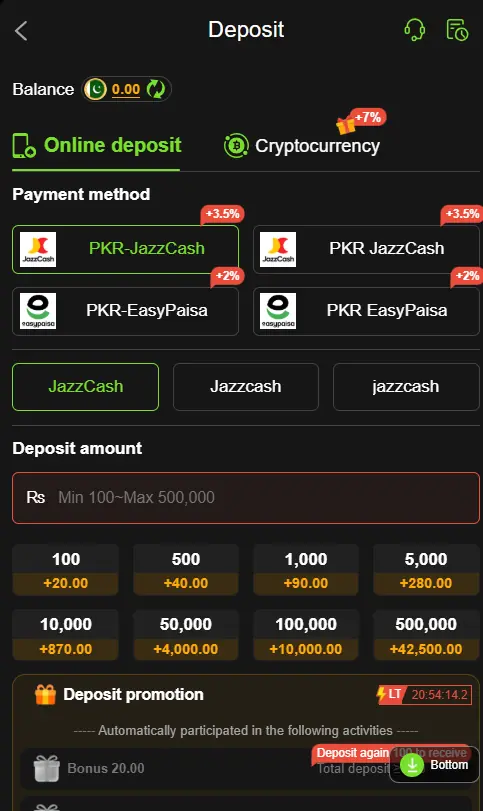
How to Deposit Money on 786Bet Game?
Adding funds to a 786Bet APK account can be completed through the available payment option in the account dashboard.
- Log in to your 786Bet account.
- Open the Deposit section.
- Select an available payment method.
- Enter the amount you want to deposit.
- Follow the payment instructions shown on the screen.
- Complete the transaction and check your account balance.
How to Withdraw Money from 786Bet Game?
Users who have an eligible balance may request a withdrawal through the available withdrawal section.
- Log in to your 786Bet account.
- Open the Withdrawal section.
- Select an available withdrawal method.
- Enter the required account or payment details.
- Enter the withdrawal amount.
- Confirm the request and wait for processing.
Available Payment Methods on 786Bet Game
Depending on the current platform setup, Pakistani users may see local payment options such as JazzCash and Easypaisa, along with other methods. Payment options and availability can vary, so always confirm the methods displayed in your own account.
Important Deposit and Withdrawal Tips
Always double-check your payment details before confirming a transaction. Do not share your password, PIN, or OTP with anyone, and avoid using payment accounts that do not belong to you. Before depositing real money, review the platform’s current withdrawal rules, fees, minimum limits, and verification requirements.
Conclusion
The 786Bet Game deposit and withdrawal process is designed to give users a straightforward way to manage their account balance. Simply select the relevant option, follow the instructions provided, and check the transaction status in your account. Since payment policies can change, users should verify the latest terms before making any financial transaction.